TL;DR:
WPCode lets you customize WordPress without writing code: change fonts and CSS, add tracking pixels and schema markup, organize snippets across a team, and extend post types, all from generators built into the free plugin. Used fully, it replaces 6 to 8 other plugins. Below are 19 real examples grouped by goal, each with a direct link to build it.
Most people install WPCode to fix one WordPress issue. They use it to add a tracking pixel or paste a snippet. Then they never open it again.
But WPCode is not just a code snippets plugin.
In reality, it’s a WordPress customization platform that helps you customize, extend, and automate your site without a developer or theme edits.
On average, sites that put WPCode to full use can replace 6 to 8 other plugins.
This is what we demonstrate in this article.
We grouped 19 real ways to customize WordPress with code snippets based on what you want to do: fix design, add tracking and schema, manage snippets as a team, or extend your site’s content.
Each one links directly to the WPCode feature or library snippet that makes it possible without coding.
Key Takeaways
- Learn how to use WPCode to customize your WordPress site without editing theme files or hiring a developer.
- Discover 19 practical code snippet customizations, from design tweaks and tracking pixels to schema markup and custom post types.
- See which features are available for free and which require a paid plan, so you know what you can build right away.
- Find the fastest way to install each customization using WPCode’s built-in generators, snippet library, or ready-made Snippet Packs.
- Understand how sites using WPCode often replace 6 to 8 single-purpose plugins with one centralized solution.
Find the Right WPCode Tool Faster
WPCode can solve a wide range of WordPress problems.
So, instead of listing features one by one, we’ve grouped them by goal. Choose the section that matches your needs, then follow the examples and tutorials to build it yourself.
Here’s the list at a glance:
| Goal | What You’ll Learn | Start Here |
|---|---|---|
| 🎨 Fix Design Issues | Customize your site’s appearance without editing theme files. | Custom CSS Snippets → |
| 📊 Add Tracking & Schema | Add pixels, analytics, schema, and display ads. | Conversion Pixels → |
| 🗂 Manage Team & Snippets | Organize, share, and safely manage snippets across your sites. | Private Snippet Library → |
| ⚙ Extend & Automate Content | Create custom content types and automate WordPress tasks. | Custom Post Types → |
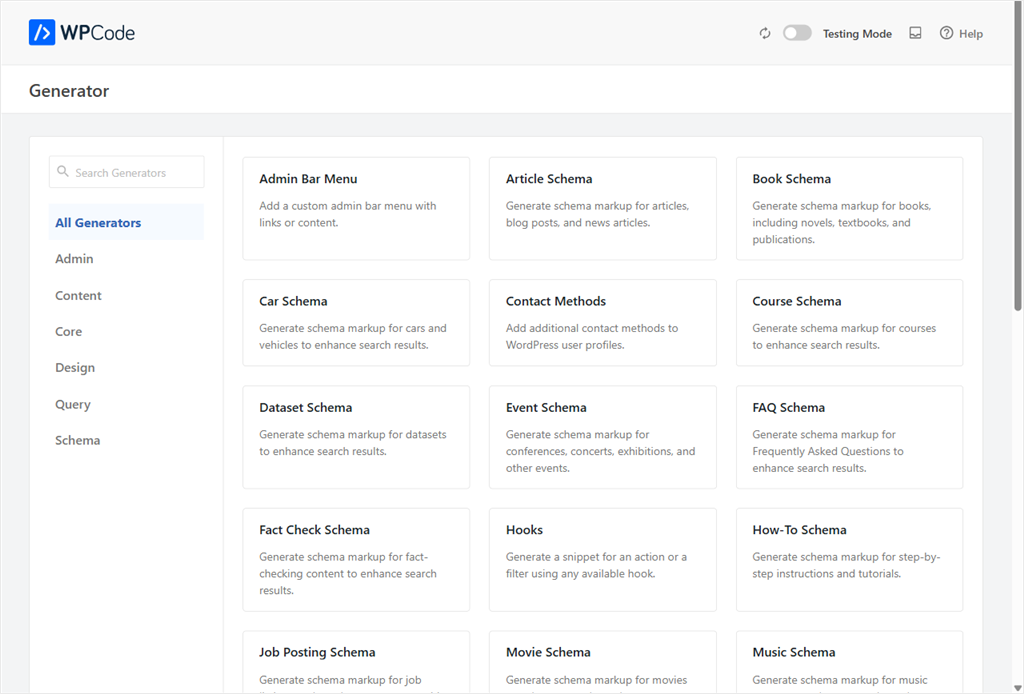
Some of the most useful WPCode features have been built out to be generators. This makes it simple for you to set up your code snippets in one click.
To access this, go to +Add Snippet and select the “Snippet Generators” tab. It is one of the best places to get started if you are new to code snippets.
The screenshot below gives you a good overview of what to expect.
With that out of the way, let’s dive in.
Fix Design Issues
| WPCode Tool | What You Can Build | Free or Pro |
|---|---|---|
| CSS Snippet Generator | Custom CSS without editing theme files or creating a child theme. | Free |
| Live CSS Preview | Preview CSS changes before publishing them to your live site. | Free |
Your site’s look shouldn’t need a developer every time you want to change it. These two put design control back in your hands, safely enough that a mistake never reaches your live site.
1. Custom CSS Snippets
Say you want rounder buttons, a different heading color, or a mobile menu that stops overlapping your logo. Normally that means a child theme, a CSS file, and a way to undo it if something breaks.
WPCode gives you a CSS snippet instead.
Add a new snippet, set its code type to CSS, and write the change. This way you don’t use a child theme, FTP, or touch your live stylesheet directly.
Install: Code Snippets » Add Snippet » set Code Type to CSS.
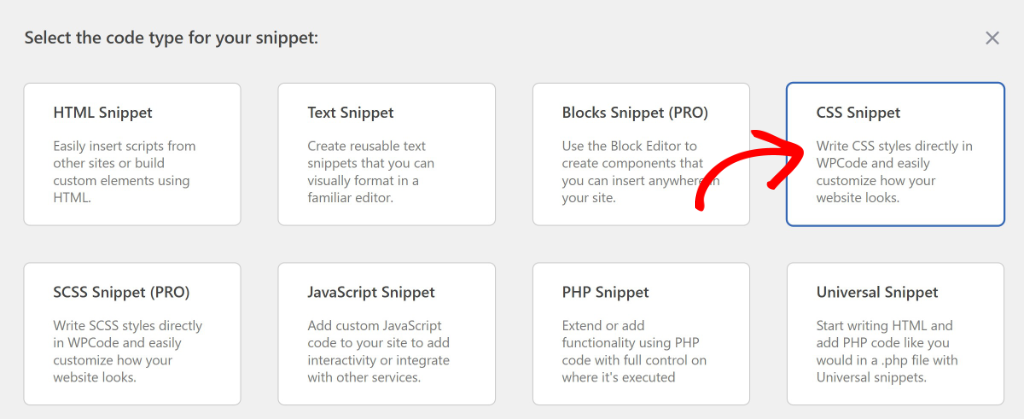
Check out how using WPCode to add CSS is different from other methods.
2. Live CSS Preview
CSS is a guessing game until you see it. Live Preview removes the guessing. Open a CSS snippet, click Live Preview, and watch your change apply to the real page right next to the editor.
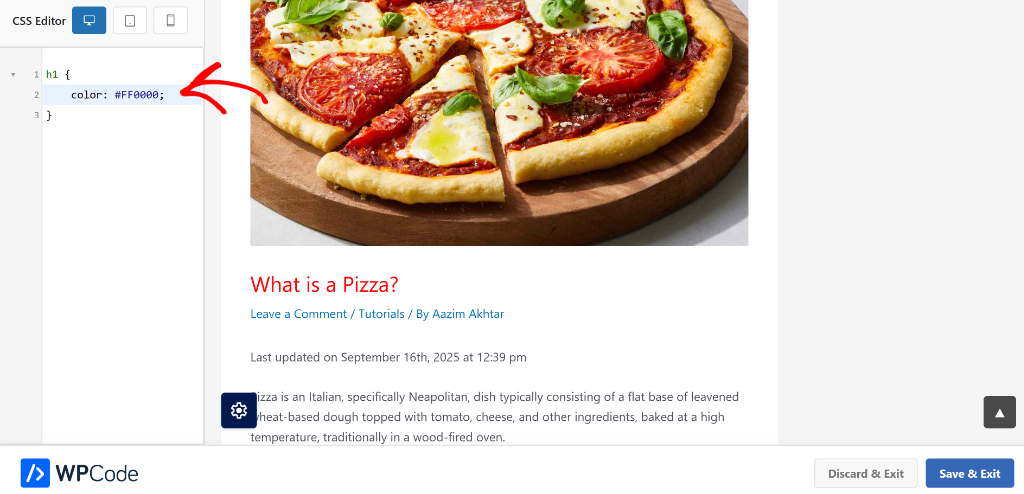
Nothing goes live until you click Save.
See how to use the CSS preview feature to make your customization seamless.
⚠ Note: CSS and SCSS only. PHP, JS, and HTML snippets don’t get a live preview.
More Ways to Polish Your Design
Google Fonts: Add any Google Font to your WordPress site, and it stays in place even after you switch themes. Here’s how to add Google Fonts in WordPress.
Disable the Admin Bar: Hide the black admin toolbar for specific roles, so clients or editors never see backend clutter. Full walkthrough: disabling the admin bar in WordPress.
Replace Your Login Logo: Swap WordPress’s default logo on the login screen for your own brand, in under five minutes. See how to replace your WordPress login logo.
Target Any Element With CSS (paid plans): Insert code before, after, or in place of one specific element using its CSS selector, no theme file access needed. The same location type can fully replace an element too, useful for swapping out a widget without a plugin. Step-by-step: adding code before HTML elements.
Add Tracking & Schema
| WPCode Tool | What You Can Build | Free or Pro |
|---|---|---|
| Conversion Pixels | Track conversions with Meta, Google, TikTok, Snapchat, and Pinterest pixels. | Plus and up |
| Header & Footer Scripts | Add analytics, verification, and marketing scripts sitewide. | Free |
| Schema Generator | Generate 19 schema types including FAQs, recipes, products, and more. | Free |
| Person Schema Generator | Add author and entity schema to strengthen your site’s knowledge graph. | Free |
| Code Snippets + Conditional Logic | Insert display ads exactly where you want them without editing templates. | Free |
This is where WPCode earns a reputation as a marketing tool, not just a developer tool. The best part is most of these features ship on the free version of WPCode.
3. Conversion Pixels
Facebook, Google, TikTok, Snapchat, and Pinterest all want a pixel on your site to track conversions. Normally that means five different embed codes and remembering to test each one.
WPCode’s Conversion Pixels add-on gives each platform its own settings screen. Paste your pixel ID once, set which pages or events fire it, and it’s done.
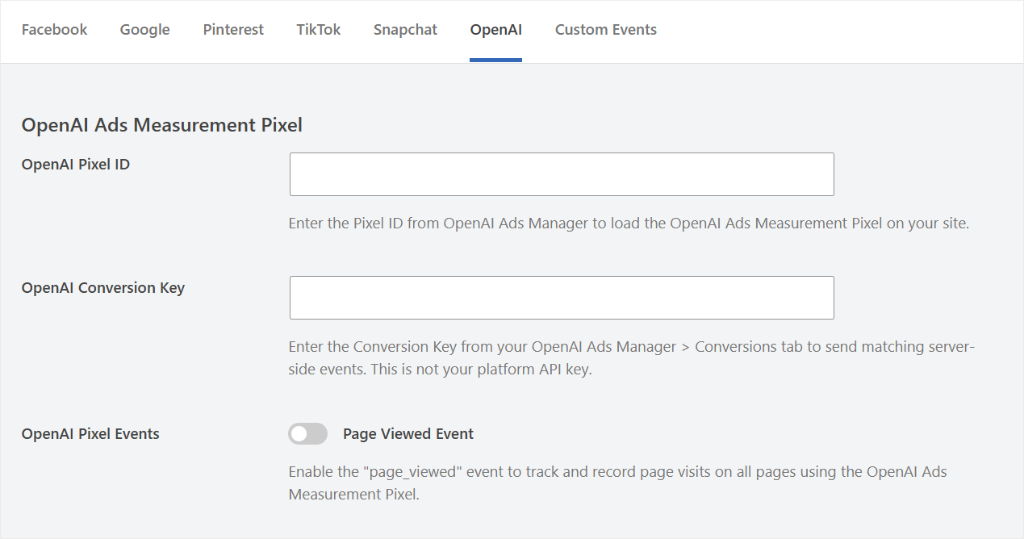
On top of that, you can also set up ecommerce event tracking for WooCommerce, Easy Digital Downloads, and MemberPress.
⚠ Plan note: This automated version is a Plus-plan feature and up. The free plugin still lets you paste a pixel script manually into the header field, you just lose the per-platform settings screen and conditional firing.
Check out these posts if you need help setting up different conversion pixels with WPCode.
- How to Set Up Facebook Pixel custom event tracking in WordPress
- Set up OpenAI conversion pixel
- Add custom event tracking for Snapchat Pixel
- Set up custom event tracking for WPCode Conversion Pixels
- Add TikTok Pixel in WordPress without coding
- How to set up a Pixel tag and track it
4. Analytics & Global Header-Footer Scripts
Whether it’s Google Analytics, a heatmap tool, or a chat widget’s install script, it usually needs to sit in your site’s header or footer, on every page.
WPCode’s global header and footer fields do exactly that in one place, free on every plan. Paste the script once. It runs sitewide, without editing header.php or footer.php.
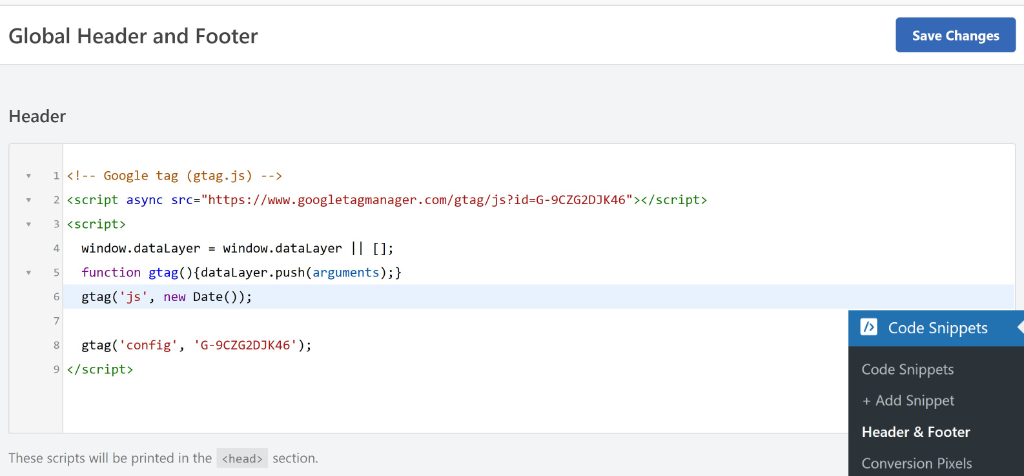
Check out this article to see how to add Google Analytics in WordPress. Also check out how to add header and footer code with WPCode.
5. Schema Generator
Rich results in Google (star ratings, FAQs, how-to steps) run on schema markup. Writing that markup by hand means learning JSON-LD syntax most site owners never touch.
WPCode’s Schema generator covers 19 schema types: Article, FAQ, How-To, Event, Product, Recipe, Video, Course, Job Posting, and more. Every one is a fill-in-the-form generator. No code.
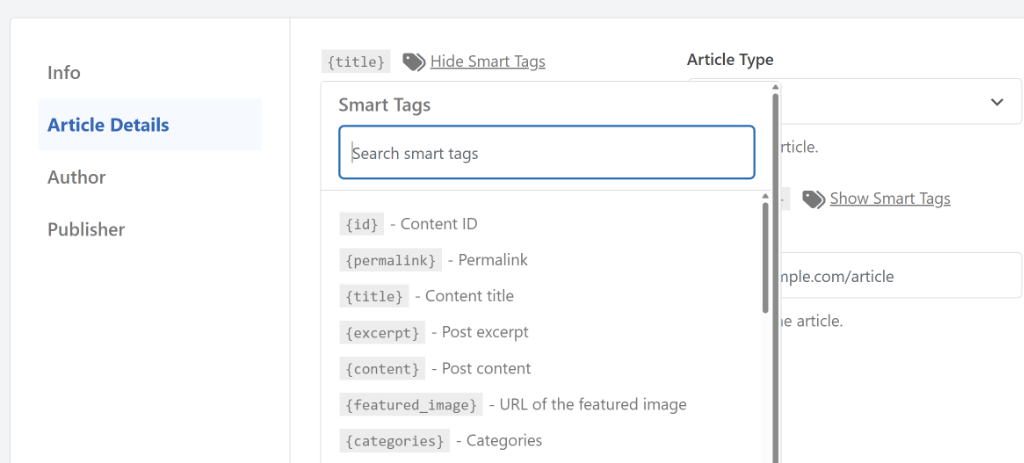
⚠ Check first: Check whatever SEO plugin you’re already running first. Adding a second FAQ or Article schema block on top of one your SEO plugin already outputs creates a duplicate that can confuse Google, not help it.
Check out this article to learn how to set up schema.
6. Build Entity Authority With WPCode
Google doesn’t just want to know what your page says anymore. AI search doesn’t either.
Both want to know who said it, and whether that person or brand is a real, connected entity across the web.
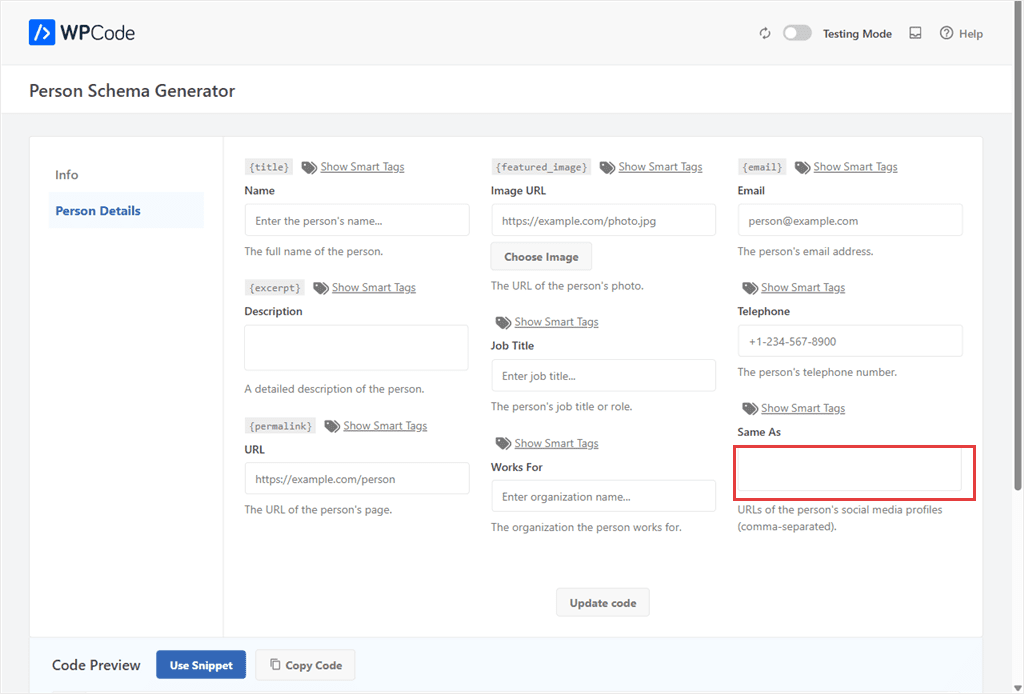
That’s what Person schema is for: a structured way to tell Google who you are, your name, your job title, your social profiles, and how they all connect.
I’ve used this exact generator to build entity signals for a client site. All you have to do is add the name, role, and other details shown in the personal schema page.
Then in the sameAs bar, add links to every verified profile across the internet. This tells Google that those profiles belong to the same person.
Install: Code Snippets » Add Snippet » Snippet Generators tab » Person Schema.
More Schema Types to Build
FAQ Schema: Turn your existing FAQ section into an expandable rich result in Google search, without a schema plugin. Here’s how to add FAQ schema in WordPress.
Video Schema: Mark up an embedded video so Google can show a thumbnail and duration right in search results. Full guide: adding video schema markup.
Recipe Schema: Add the exact markup Google needs to show ratings, cook time, and ingredients for a recipe post. See how to add recipe schema to your site.
7. Monetize With Display Ads
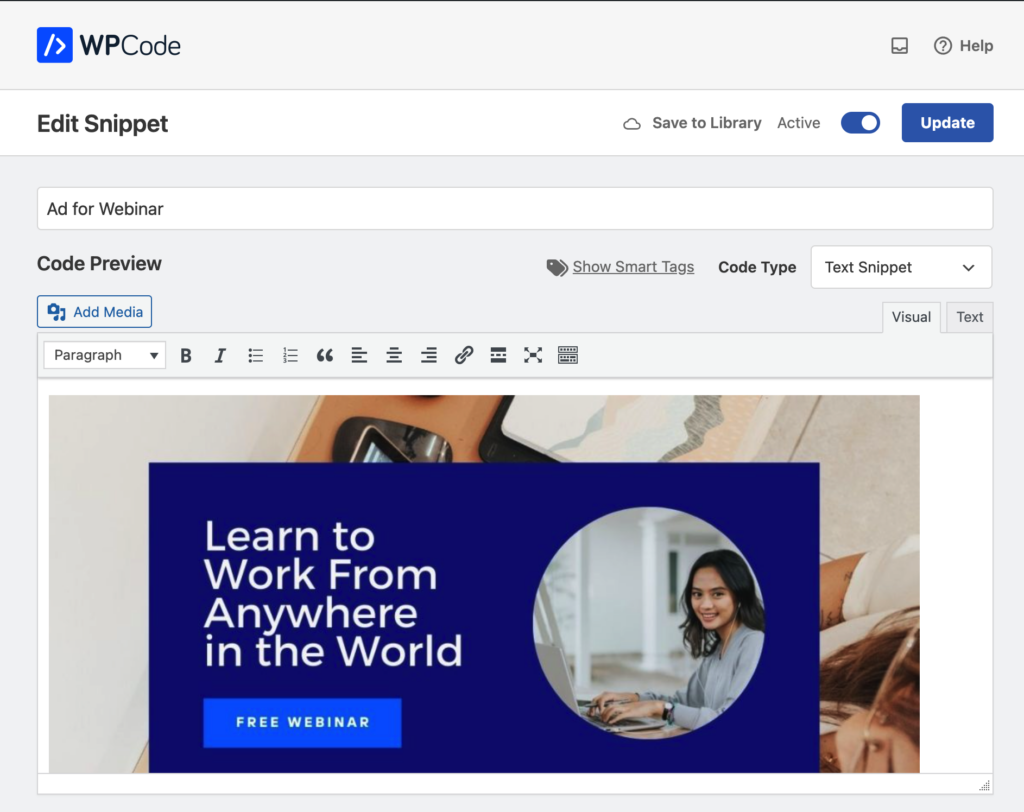
WPCode is not an ad display plugin. But its flexibility allows you to combine several free features to place display ads exactly where you want them.
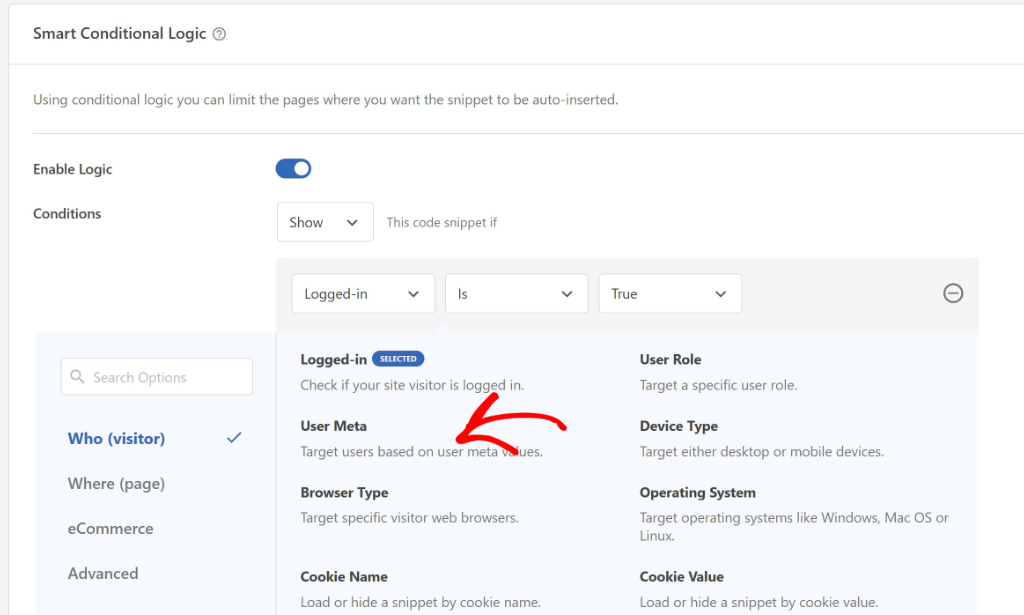
Drop your ad network’s script into an HTML or JavaScript snippet, use Smart Conditional Logic so it only shows on posts you don’t want, like your homepage or checkout.
Then, use the Schedule feature if you’re running a limited-time sponsored placement instead of a permanent one. You can use the same three building blocks to get a different combination each time.
⚠ Note: This is a build, not a single click. Budget a few extra minutes over a dedicated ad-management plugin.
Manage Team & Snippets
| WPCode Tool | What You Can Build | Free or Pro |
|---|---|---|
| Private Cloud Library | Share approved snippets across client sites and team members. | Paid plans |
| Tags & Filters | Organize and quickly find snippets as your library grows. | Free |
| Cloud Library | Install ready-made snippets with one click. | Free |
| Snippet Packs | Install complete bundles of related snippets at once. | Free |
| Safe Mode | Recover from PHP errors without locking yourself out of WordPress. | Free |
| AI Snippet Generator | Generate or improve custom code using plain English prompts. | Pro & up |
If you manage snippets across more than one site, share access with a client or a team; this is where WPCode stops being a personal tool and becomes infrastructure.
8. Private Snippet Library + Access Control
A team of five people editing raw PHP on a live site is a real risk. WPCode’s private library lets you save snippets once, then control who can add, edit, or just toggle them on and off.
A client can activate a snippet you built. They can’t break it by editing the code.
You can access your snippet library both on your WordPress dashboard and in your WPCode account.
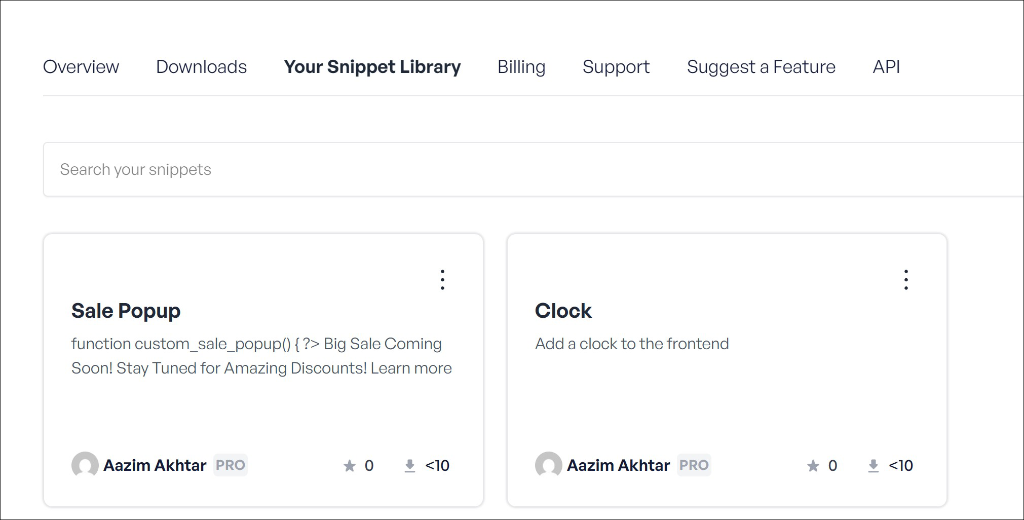
Check out how to set up your private snippet library.
9. 1-Click Library Install
Apart from your private library, you can also access the free WPCode code snippet library with over 3000 built snippets. This collection is made by both the WPCode team and the community.
Meaning, there is a good chance whatever issue you are trying to solve already has a snippet built.
Browse WPCode’s library, find a snippet that solves your problem, and add it with one click. No copy, no paste, no reformatting.
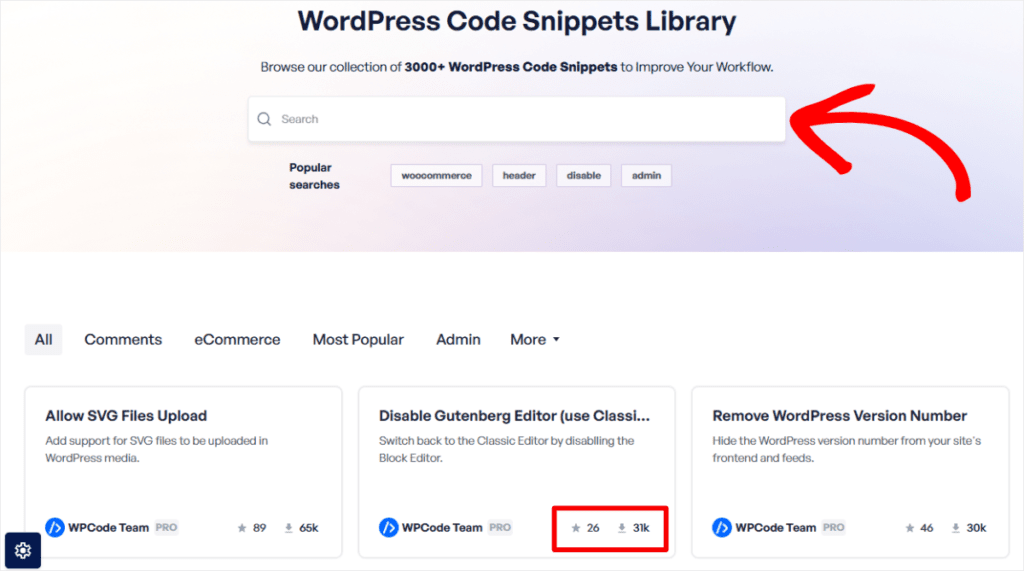
Updates work the same way. When a library snippet you’re using gets improved, an “Update Available” button appears in your dashboard.
10. Generate Custom Code With AI
Even with such a large snippet library, sometimes what you need doesn’t exist yet, and writing PHP yourself isn’t an option.
WPCode’s AI Snippet Generator writes the snippet for you.
Describe what you want in plain English, and it returns working code. Plus a suggested Conditional Logic rule if your request implies one. You get suggestions like “only on mobile” or “only for logged-out users.
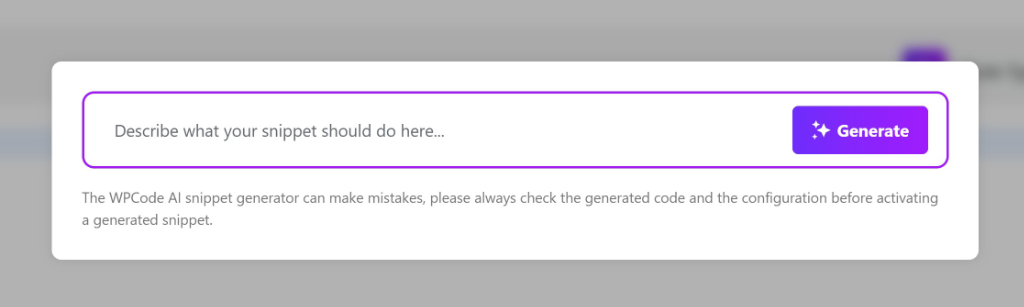
An “Improve This Snippet” option works the same way on code you already have. This is useful for cleaning up something copied from an old tutorial.
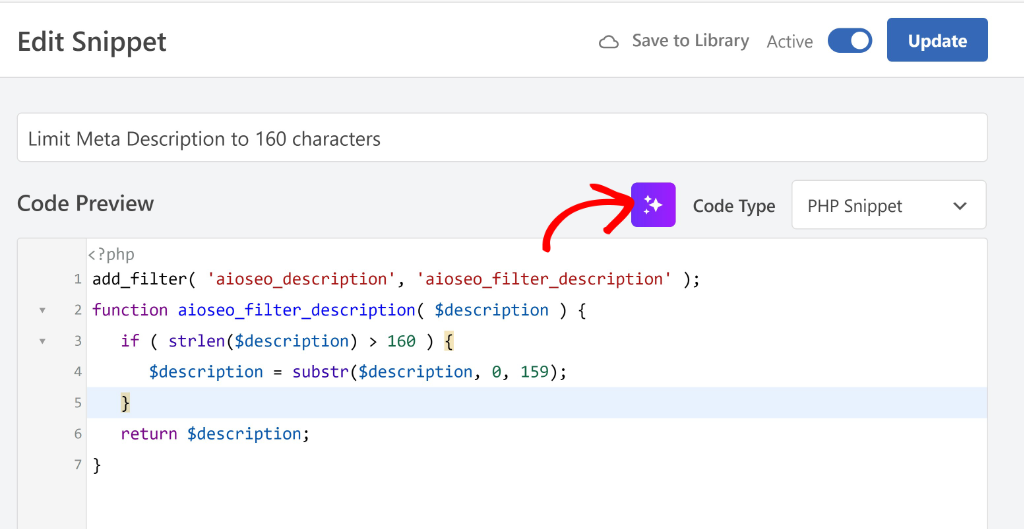
⚠ Plan note: Pro plan and up: 500 AI-generated snippets a month on Pro, 1,000 on the Bundle plan.
⚠ AI snippet generation is only available for PHP
Check out this post to see how to use WPCode’s AI to set up PHP code snippets.
11. Snippet Organisation
Once you’re past ten snippets, remembering what each one does gets hard. WPCode’s description field and tags like Security, Performance, SEO, Tracking, and UI turn your snippet list into something searchable.
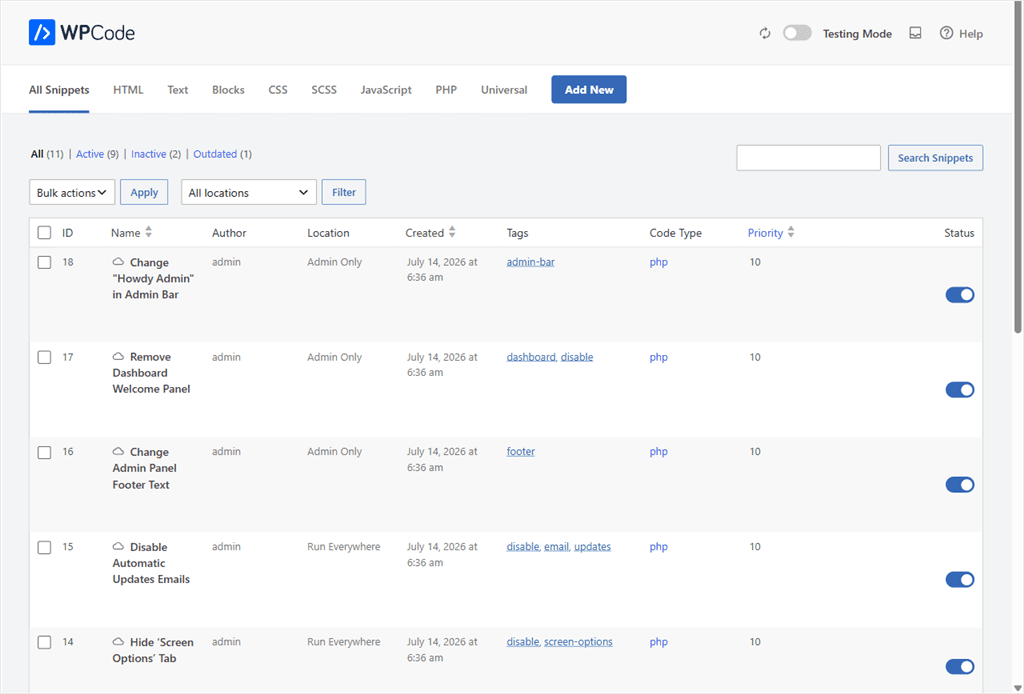
12. Snippet Packs
Snippet Packs take organization further.
Sometimes you don’t need one snippet. You need five that work together.
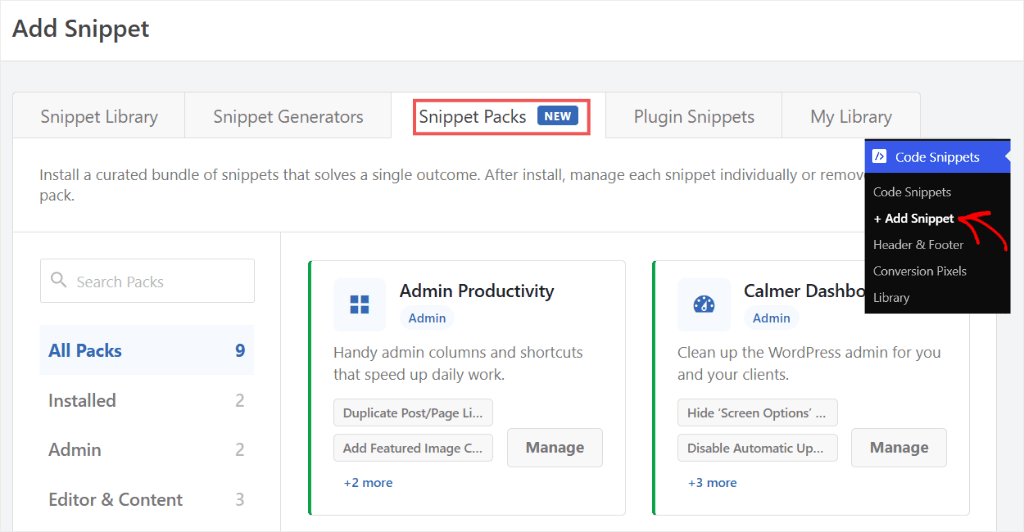
Snippet Packs bundle related snippets, like an Admin Productivity pack or a Calmer Dashboard pack, into a single install. I tested two packs on a fresh install.
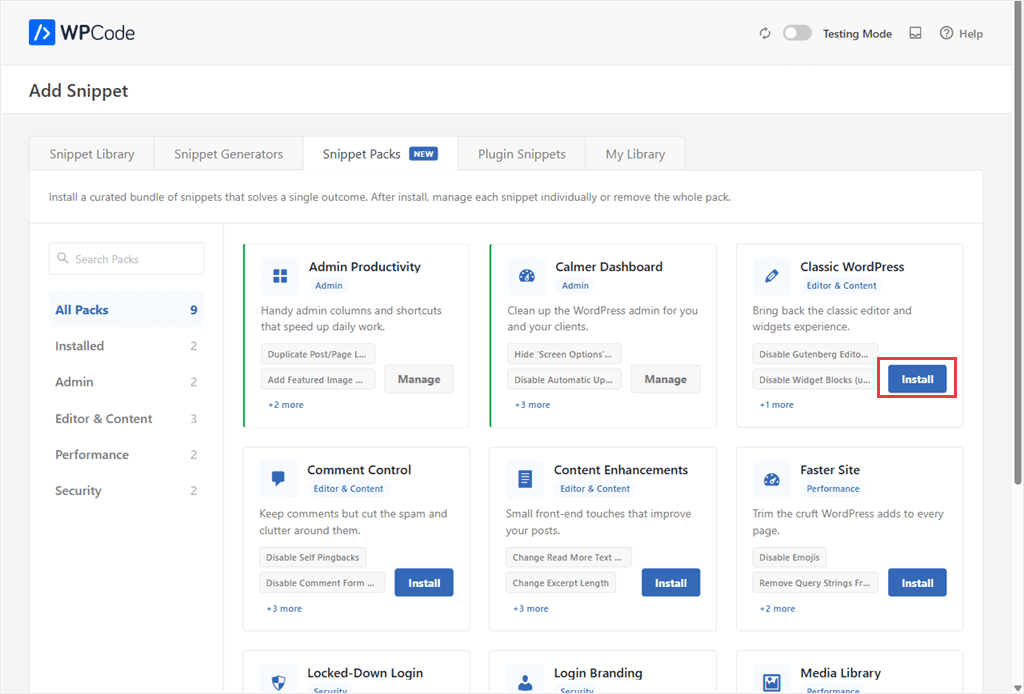
Both installed in about two seconds each, with every snippet active immediately.
⚠ One catch: a brand new site needs to connect to the WPCode library first, a one-time step, before any pack shows up.
Check out how to set up Snippet Packs here.
13. Safe Mode & PHP Error Handling
The fear with any code snippet plugin is one bad snippet taking down your whole site. WPCode auto-deactivates a snippet the moment it causes a PHP error, and highlights the exact broken line.
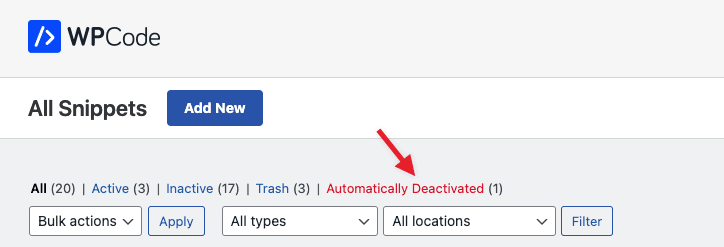
On top of that, if you’re ever locked out completely, adding ?wpcode-safe-mode=1 to your wp-admin URL disables every snippet at once. No code access needed.
Learn how to debug your WordPress snippets in WPCode.
Prefer Adding Code Yourself?
Copy-Paste Code Snippets: You can paste code in yourself instead of using a generator. Here’s the safe way to copy-paste code snippets into WordPress without breaking your site.
Extend & Automate Content
| WPCode Tool | What You Can Build | Free or Pro |
|---|---|---|
| Custom Post Types Generator | Create portfolios, testimonials, recipes, events, and other custom content. | Free |
| Admin Menu Builder | Add shortcuts to frequently used WordPress admin pages. | Free |
| Dynamic Shortcodes | Display reusable dynamic content anywhere on your site. | Free |
| Cron Generator | Schedule recurring WordPress tasks without writing cron expressions. | Free |
| Snippet Scheduling | Automatically run seasonal campaigns and time-sensitive promotions. | Free |
| Disable Features | Turn off unwanted built-in WordPress features to simplify your site. | Free |
These generators replace the kind of custom code that used to need a developer on retainer. They make advanced WordPress customization accessible to anyone, even if you’ve never written code before.
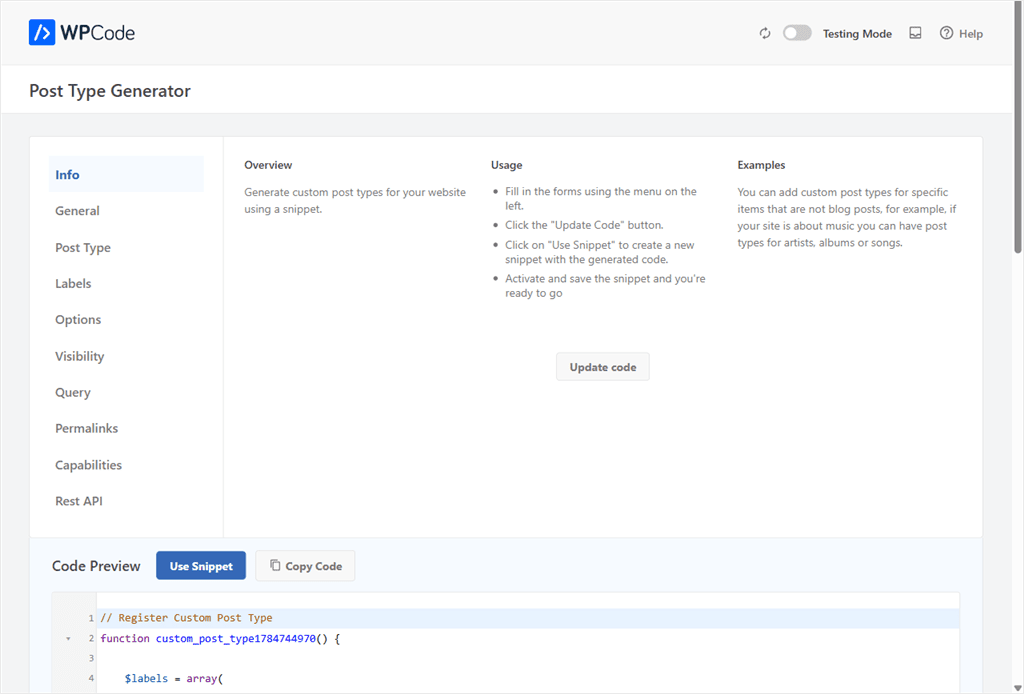
14. Custom Post Types & Taxonomies Generator
Adding a “Testimonials” or “Portfolio” content type to WordPress normally means a developer writing register_post_type() by hand.
WPCode’s generator does the same job through a form. Name your content type, set its fields, and it builds the code for you.
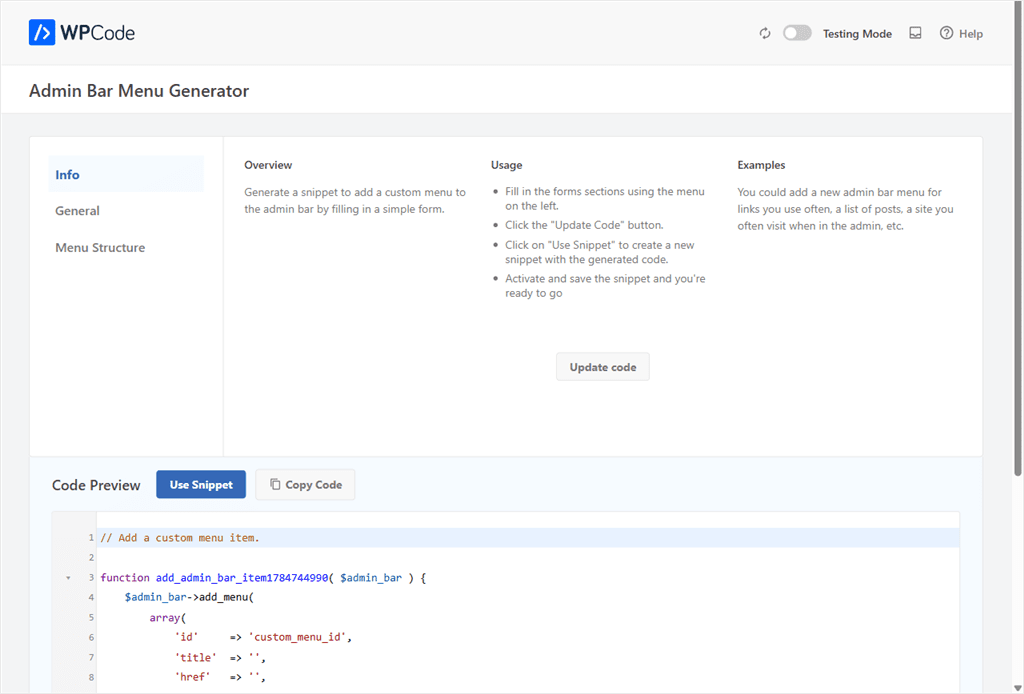
15. Admin Shortcuts Menu Generator
If you’re always three clicks deep to reach the page you need, this fixes it. Build a custom admin bar menu with shortcuts to the screens you use most, generated without touching a line of code.
16. Dynamic Shortcodes
A shortcode that always outputs the same thing is limiting. WPCode’s dynamic shortcodes accept attributes, so the same shortcode can output different content depending on what you pass it from the page.
For example, you can automatically display the current year in your website footer.
So, it updates every January without editing your site. It’s a small touch that keeps your site looking current while saving you from making the same update every year.
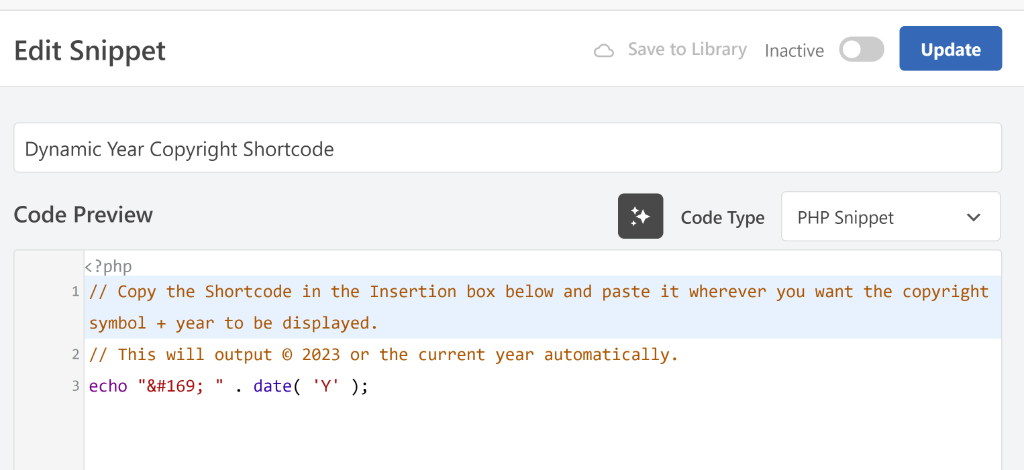
Check out this post on how to add a dynamic copyright date in the WordPress footer.
Apart from that, you can also display dynamic values from custom fields, author information, URLs, and other WordPress data anywhere on your site.
17. Cronjob Generator (Scheduled Tasks)
Want a task that runs every night without you remembering to trigger it? Something like clearing a transient cache or pinging an external API?
WPCode’s Cronjob generator builds the scheduled task for you. No server access, no crontab file.
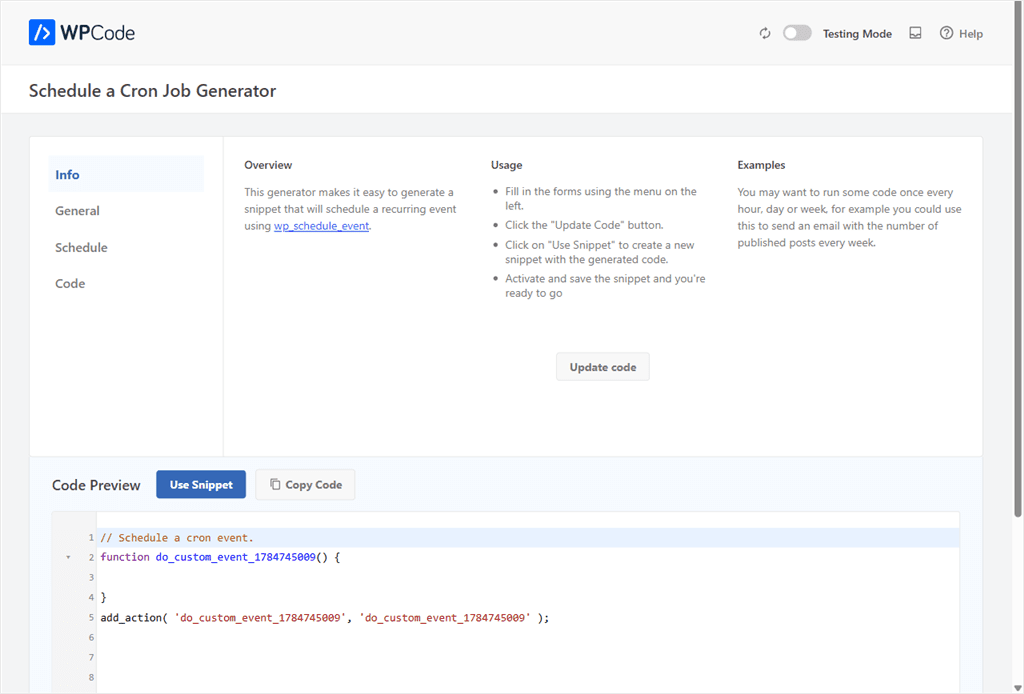
wp_schedule_event.18. Schedule Campaigns & Promotions
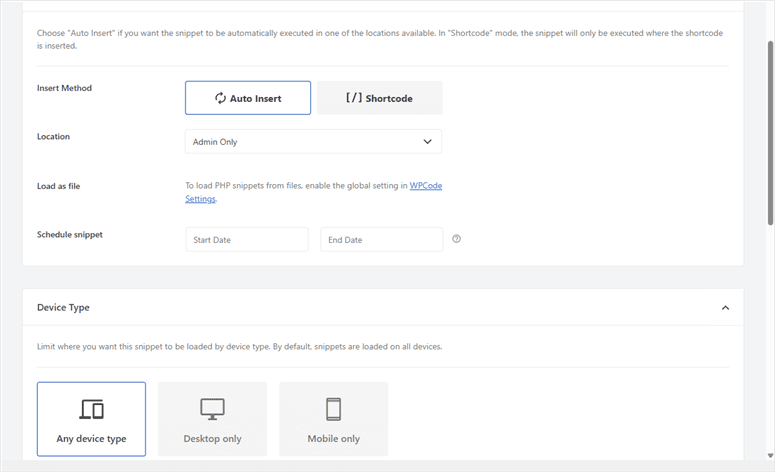
A promotion that runs Monday to Sunday and needs to disappear automatically is a different problem than a recurring background task. As a result, WPCode gives it a different tool.
Every snippet has a Schedule tab.
Set a start date, an end date, or both, and the snippet activates and deactivates itself on schedule. No cron expression to write, or remembering to come back and turn it off.
19. Disable Unwanted Features
Some of the best cleanup isn’t adding code, it’s removing what WordPress ships. For example, emoji scripts, XML-RPC, REST API links in your homepage source, or the WordPress version number leaking in your page head.
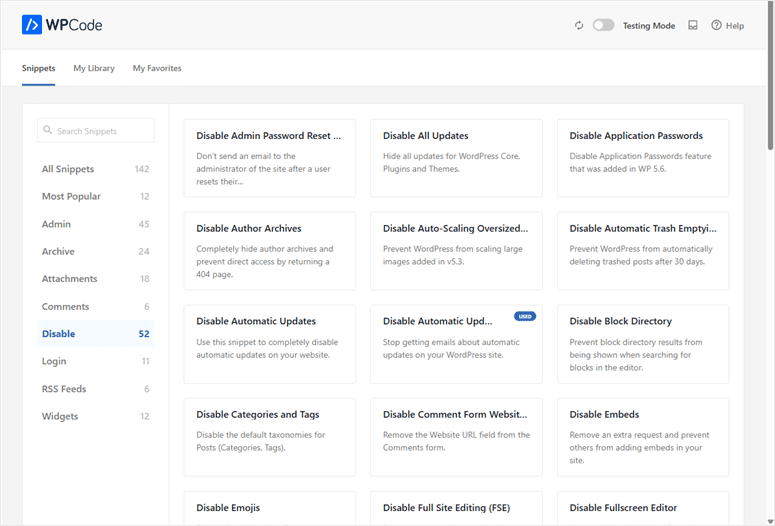
WPCode’s library has a dedicated “Disable” category with over 50 ready-made snippets for exactly this, each one a 1-click install.
Additional Ways to Extend Your Site
Maintenance Mode: Take your site offline for visitors while you work, with a branded landing page instead of a blank screen. Here’s how to enable maintenance mode in WordPress.
Change Your Footer Text: Replace the default WordPress credit line in your admin footer with your own message or branding. Full guide: changing your footer text.
Related Posts by Category: Show relevant posts under each article automatically, sorted by category, with no related-posts plugin needed. See how to add related posts by category.
More Things WPCode Can Do
That’s not everything. If we write in detail about everything WPCode can do, it will end up being an eBook. So for the other important features, we have summarized them below.
We have narrowed these additional features down to what WPCode’s conditional logic and smart tags also handle:
- Show a Message to Logged-In Users Only: Display extra content or offers exclusively to registered users, using one conditional logic rule. Here’s how Smart Conditional Logic works.
- Greet Visitors by Name: Insert a visitor’s name or account details directly into a message using WPCode’s smart tags. Full docs: WPCode’s smart tags.
- Add a Chatbot Without Slowing Down Every Page: Load a chatbot script only where it’s needed, instead of on every single page load. See how to add custom HTML code to WordPress.
- Highlight Content by Day of the Week: Show a different banner or offer automatically depending on which day a visitor arrives. Here’s how WPCode’s scheduling feature works.
- Cross-Promote WooCommerce Products: Show related products on the cart or checkout page, based on what’s already inside it. Full details: WPCode’s WooCommerce integration.
- Add a Mobile-Only Call Button: Show a click-to-call button exclusively on phones, using device-type conditional logic. See how Smart Conditional Logic works.
- Connect External Tools Like Mailchimp or HubSpot: Insert a platform’s install script once, sitewide, without editing a single template file. Here’s how to add custom HTML code to WordPress.
That’s it for our list of WPCode capabilities. But this list is long and can be overwhelming. To help you with your specific task, check out the section below.
Where to Start
You don’t need all 19 of these on day one. Pick the one goal that’s costing you the most right now.
Here’s the pattern underneath all of it.
Every one of these tasks used to mean editing a file, hiring a developer, or installing a separate plugin.
WPCode replaces that with a form, a generator, or a one-click install, all inside the free plugin. And that’s how a site ends up cutting 6 to 8 plugins instead of adding one more.
Check out the table below to see where to start.
| If You Want To… | Recommended Tool | Difficulty |
|---|---|---|
| Improve your site’s design | CSS Snippet Generator | Easy |
| Track conversions | Conversion Pixels | Easy |
| Add Google Analytics or GTM | Header & Footer Scripts | Easy |
| Improve your SEO | Schema Generator | Easy |
| Build topical authority | Person Schema Generator | Easy |
| Manage dozens of snippets | Tags & Filters | Easy |
| Share snippets across multiple sites | Private Cloud Library | Medium |
| Create portfolios, testimonials, or other custom content | Custom Post Types Generator | Easy |
| Run seasonal campaigns | Snippet Scheduling | Easy |
As you can see, the real question isn’t “what does WPCode do.” It is “How can WPCode help me?”
It’s not one feature. It’s the plugin you open every time WordPress needs something a theme can’t do alone.
Frequently Asked Questions
Is WPCode free?
Yes. Every generator and use case in this article, including the full schema markup suite, runs on the free WPCode plugin. Pro adds the private cloud library, code revisions, and a few advanced extras.
Do I need to know how to code to use WPCode?
No. Every example here uses a generator, a settings screen, or a 1-click library install. None require writing code yourself.
Can WPCode replace other WordPress plugins?
Often, yes. Disabling XML-RPC, adding tracking pixels, building schema markup, and creating custom post types each normally need a dedicated plugin. WPCode replaces each with one snippet. On average, a site using it fully cuts 6 to 8 other plugins.
What happens if a WPCode snippet breaks my site?
WPCode auto-deactivates any snippet that causes a PHP error and shows you the exact line. Safe Mode can disable every snippet at once if you’re ever locked out.
Start Building With WPCode
You’ve just seen 19 different ways to customize WordPress without a developer, a theme file, or a new plugin. The next step is smaller than it looks. Pick one, and build it today.
Every example above starts in the same place: your WPCode dashboard. Browse the WPCode library, including the new Snippet Packs, for 1-click installs of everything on this list.
Additional Resources
These take you further with WPCode, right after this one.
- What Is a Code Snippet?: the plain-English foundation this article builds on
- WPCode homepage: the plugin behind every generator above
- WPCode Features: the full capability list, straight from the source