
Do you worry about how adding custom code affects your website’s loading speed?
I know that performance is critical. Every millisecond counts when it comes to user experience and SEO rankings. At the same time, advanced users and teams have been asking for better ways to manage their snippets using modern development workflows.
That’s why I am thrilled to announce the release of WPCode 2.3.3!
This update introduces a powerful new option for WPCode Pro users to load snippets as files, along with important compatibility updates for the future of WordPress.
Let’s dive into the details.
Load PHP, HTML, and Other Snippets as Files
By default, WPCode loads code snippets directly from your WordPress database. While this is efficient for most sites, our team wanted to offer more control to advanced users who have many snippets or wish to use external versioning for snippets.
So, with WPCode 2.3.3, you can now load snippets as files in the Pro version.
To enable this option, simply head to the ‘Settings’ page of WPCode. From here, scroll down to the Load PHP Snippets as Files option and click the toggle to enable it.
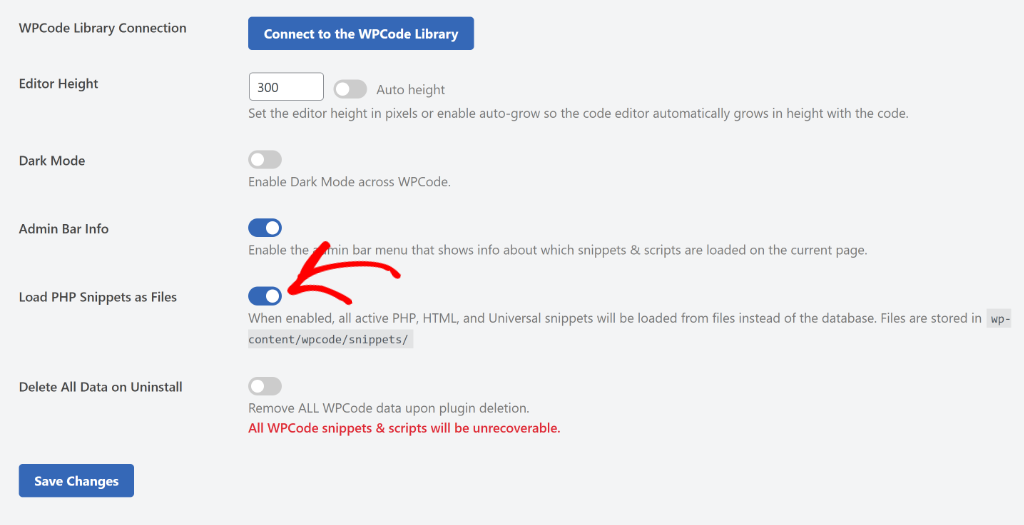
Why should you use this new feature? It brings two major benefits to your workflow:
1. Improved Website Performance
When you switch to loading snippets as files, you reduce the number of database queries required to load your site.
In our internal tests, we saw up to a 17% increase in load times when this feature was enabled.
Note: Results will vary depending on your hosting service and how many snippets you are currently loading on your site, but this is a significant step forward for optimization.
2. Version Control Management
For developers and agencies managing client sites, keeping track of code changes is essential.
By loading snippets as physical files on your server, you can now manage your snippets using version control systems like Git.
Besides that, WPCode 2.3.3 also brings improved compatibility with PHP 8.5.
Whether you are already testing the latest PHP versions or planning to upgrade soon, WPCode is ready to run smoothly without interruption.
With that, these new features are available now in WPCode 2.3.3.
If you are a Pro user, you can update today to start loading your snippets as files and enjoy the performance boost. And if you are using the free version, then this is the perfect time to upgrade to WPCode Pro to unlock this new feature today, along with other powerful advanced features.
As always, thank you for using WPCode. I have many more exciting updates in the pipeline, so stay tuned!
If you have any questions or need more information, don’t hesitate to reach out. Our team is always here to assist you.