
Ever spent hours tweaking CSS snippets, switching between tabs, refreshing your browser, and pulling your hair out trying to get your styling just right?
Most WordPress site owners waste countless hours making simple CSS changes because they can’t see their changes in real-time.
Well, that’s about to change because I’m thrilled to announce our brand new Live Preview feature for WPCode!
Now, you can see your CSS and SCSS changes instantly, right inside the WPCode code editor.
Let’s take a closer look at this new feature…
View Live Preview of CSS/SCSS Snippets
If you have ever tried to change a button color, adjust a font size, or tweak a layout using custom CSS or SCSS code snippets in WordPress, then you know the struggle.
The workflow involves unnecessary steps where you’d have to insert a line of code, save your theme files, open a new tab, and refresh your website to see how it looks.
And when realize that something doesn’t work, you have to go through all of these steps again to adjust the CSS snippet.
With the new Live Preview feature in WPCode, you no longer have to guess what your changes will look like. You can now see them happen in real-time, right alongside your code editor.
Simply add a c in WPCode and click the Live Preview button.
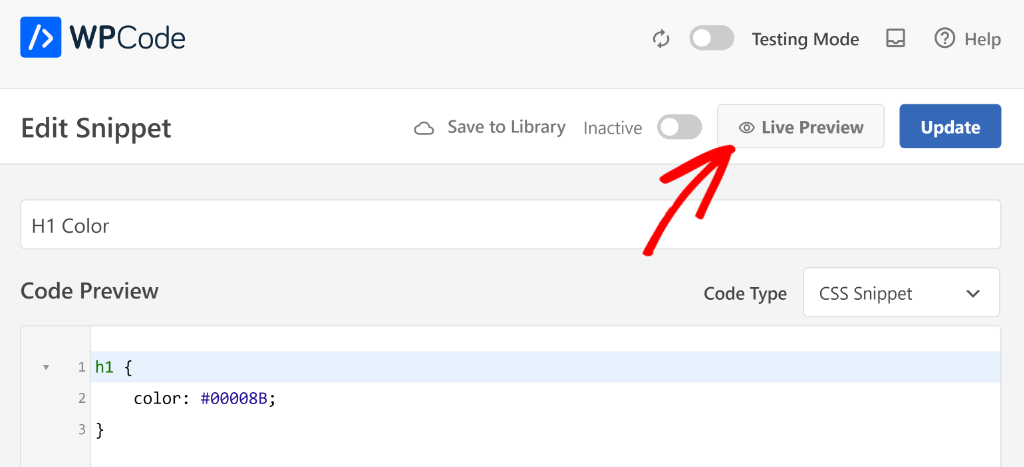
On the next screen, you’ll see a preview of the snippet. The best part is that you can make changes to your code in the Editor and see how it looks in real-time on your website.
For example, picture yourself making that perfect color adjustment to your site’s H1 headings. As you type the hex code, you instantly see it change right before your eyes.
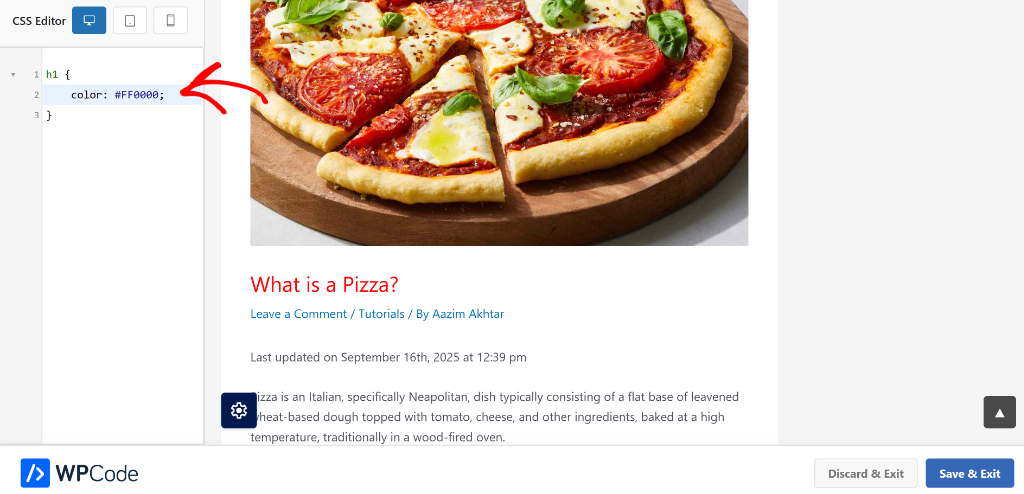
And when you’re happy with your changes, you can simply click the ‘Save & Exit’ button in the bottom.
For SCSS users, this is new feature is a game changer. SCSS typically requires a separate compilation step and workflow.
With WPCode Pro, you get instant SCSS compilation and preview, all within your WordPress dashboard.
So give Live Preview a try today, and experience the difference real-time visual feedback makes in your workflow.
Lastly, thank you for your continued support of WPCode and making it the best WordPress code snippet plugin.
If you have any questions or need more information, then don’t hesitate to reach out. Our team is always here to assist you.